Protes
Like Notepad but with database storage:
Free download & open source... Windows Only
View the cross platform successor (Avalonia .NET 8.0)
PND →
[Protes] - Pro Notes Database
Tired of managing hundreds of scattered .txt files? Protes brings that familiar simplicity into a powerful, organized database—without sacrificing the feel you love.
- Your notes live in a clean, searchable file (
.db or .prote) or works with external databases
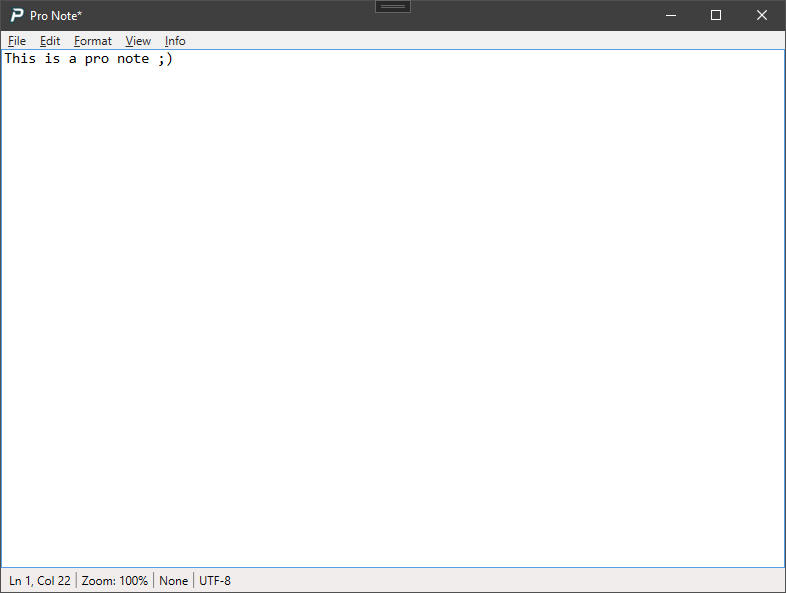
- The Note Editor looks and feels like classic Notepad
- Import entire folders of
.txt, .md, or .csv files in seconds—perfect for migrating from legacy systems
- Export any note back to
.txt or .md anytime—ideal for sharing, backup, or version control
- Double-click a
.prote file to open it.
🔒 Privacy & Control — Password & Encryption
100% local by default. — your notes never leave your machine unless you choose to connect externally.
- Optional MySQL/External DB support — sync across devices securely when needed
- 🛡️ Password/Lock System: Your password is SHA256 encrypted and cannot be recovered. Data is not safe from hackers with only a password. Use Encryption for safety
- 🔑 AES-256 Encryption: Encrypt entire notes (title, tags, and content) with a key derived from your password + salt. Encrypted notes appear as
[Encrypted Data] in the UI
- 🔐 Transparent security warnings: Clear alerts and warnings about the potential dangers of password and data loss
- 🧾 Data trail: Encryption state is always visible—never guess whether your data is secure
🧰 Powerful, Polished (but basic) UI
- Fully customizable toolbar — show/hide Connect, Local DB, ACOS, Import/Export, Search, Lock Tool, and more via Settings
- Real-time UI updates — toggle settings anywhere (menu, SettingsWindow) and see changes instantly—no restart required
- System tray integration — minimize to tray, close to tray, or quit fully. Your choice
- Right-click context menus everywhere — including database switching and external profile management
🎨 Personalized Experience
- Per-window font settings:
- MainWindow: Database view with independent control over FontFamily, FontWeight, and FontStyle
- NoteEditorWindow: Classic Notepad feel—but with better font support and RTF-like editing
- Zoomable DataGrid — adjust note list size with
Ctrl + / - / 0 (independent of font settings)
- Persistent UI state — customize the toolbar icons
📦 Smart Database Management
- Local
.prote or .db file support—with auto-numbered exports (Note.txt, Note(1).txt, etc.) to prevent overwrites
- One-instance enforcement—opening a
.prote file activates the existing app window and prompts to switch databases
- Database switching—right-click system tray icon or use the toolbar dropdown to switch between local or external databases
- Safe file associations—
.prote extension linked to your app for seamless double-click loading
- External DB profiles—save and switch between multiple MySQL connections with one click
⌨️ Efficiency & Workflow in 'Pro Note' editor
Global keyboard shortcuts
- Multi-select notes — bulk copy, delete, export, or encrypt
- Inline editing — edit title/tags directly in the DataGrid with confirmation prompts
- Send To integration — right-click any text file or multiple text files then → Send to → Pro Note or Protes (Import)
➗ Calculator Integration
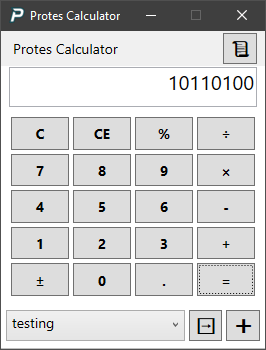
- Built-in calculator toolbar button—launches an old-school style calculator
- History tracking (last 100 calculations) with scrollable overlay
- Insert results as new notes—with full expression shown (
5 × 5 × 5 = 125) and auto-tagged as calculator
- Insert into existing notes—choose from last 10 modified entries via dropdown
🔑 AES-256 Encryption Details
Each note's title, tags, and content are encrypted individually using AES-256 in CBC mode with a unique initialization vector (IV). The encryption key is derived from your password using PBKDF2-HMAC-SHA256 with 100,000+ iterations and a per-database random salt (stored in the DB).
No part of your password is ever saved. If you forget it, encrypted data cannot be recovered—by design *USE AT YOUR OWN RISK*. Non-sensitive metadata (e.g., timestamps, IDs) remains unencrypted for usability.
Architecture Info - Designed in Visual Studio
- .NET 4.7.2 + C# 7.3 + WPF — clean, responsive, and maintainable
- Single-instance app — prevents duplicate windows; file opens trigger database switch prompts via named pipes (IPC)
- SettingsManager — wraps
Properties.Settings with shared instance pattern for live sync across windows
- Modular UI:
- MainWindow — core app with DataGrid, dynamic toolbar, status bar, and Gate Entry logic
- NoteEditorWindow — standalone rich-text editor (opens independently from tray or Send To)
- SettingsWindow — organized into tabs
- CalculatorWindow — full-featured calculator with note integration
- Event-driven refresh —
OnSettingsChanged callbacks ensure instant UI updates without restarts
- Repository pattern — abstracted data access supports both SQLite and MySQL with zero code duplication
😃 About This Project
This is my second C# application (third or fourth if you count my early experiments with C++). I built Protes to prove to myself that I could—and honestly, without AI assistance, I likely wouldn’t have shipped it in such a short time.
Thanks to my prior programming experience, I was able to develop this rapidly with AI support. C# has quickly become one of my favorite languages, and this codebase is fully compatible with C# 7.3.
While I’m still new to desktop app development with WPF and .NET, I’m committed to improving Protes—and more apps are on the way!
💖 Support This Project
If you find Protes useful, consider showing your support: